Top-Tier AI for Pocket Change! A Super-Detailed Guide to Configuring Kimi K2 in VSCode
Top-Tier AI for Pocket Change! A Super-Detailed Guide to Configuring Kimi K2 in VSCode
Friends, the AI world just blew up again! The Kimi K2 model newly released by Moonshot AI not only performs neck and neck with Claude Sonnet 4, it's also absurdly affordable! Today I'll walk you through configuring Kimi K2 in VSCode for a top-tier AI development experience that costs less than ¥0.3 a day!
🔥 Three Killer Advantages of Kimi K2
-
Performance beast:
- Coding ability firmly in the top tier, on par with Claude Sonnet 3.7~4
- 128K long context support, handles complex projects with ease
- Stunning agent performance, real "digital employee" level productivity
-
Price slasher:
Billing item Price Input tokens ¥4/million Output tokens ¥16/million (Exactly the same as DeepSeek-VL!) -
Unlimited usage: Say goodbye to Copilot's "premium request anxiety" for good, with true pay-as-you-go!
💡 Real-world cost: Building a Snake game cost just ¥0.006! Monthly spend stays comfortably under ¥10!
⚡️ VSCode Setup in Three Steps
Step 1: Get Your Kimi API Key
- Visit the Moonshot open platform
- Register or log in, then head to the console
- Click "Create API Key" to generate your own key
Step 2: Install the Cline Extension
Search the VSCode extension marketplace and install Cline, the perfect bridge for plugging in custom models
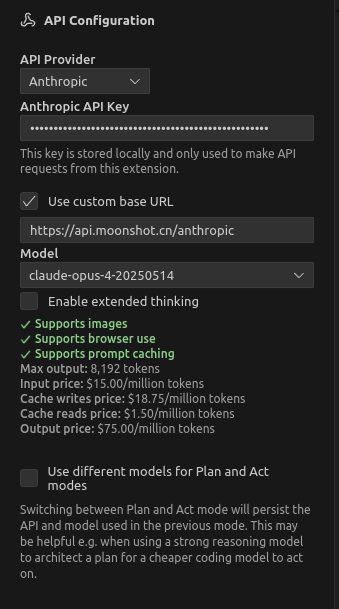
Step 3: Configure the Kimi K2 Connection
// In Cline's settings, choose Custom Provider
{
  "API Key": "your Kimi platform key",
  "Model Name": "pick whatever you like",
  "Custom URL": "https://api.moonshot.cn/anthropic",
  "Disable Browser Requests": true // Critical setting!
}
Finally I ran a quick test: a simple admin panel covering both frontend and backend, which took about an hour and cost ¥6.
Update: the latest version of Cline now supports Moonshot's K2 model. Just pick it from the list and you're good to go.